We are committed to providing an inclusive platform that is fully navigable for everyone, including users who rely on screen readers, alternative input devices, or who prefer using a keyboard over a mouse.
Standard Navigation Shortcuts
Move through GIDEON pages and activate controls using the following universal commands:
TAB: Move forward to the next interactive element (links, buttons, form fields).Shift+TAB: Move backward to the previous interactive element.EnterorSpacebar: Activate a selected button, open a menu, or select a checkbox.Esc(Escape): Close active pop-ups, modals, or dropdown menus.
Navigating Interactive Maps
When interacting with maps within the Visualize module, use your keyboard's arrow keys for precise control:
Up/Down/Left/RightArrows: When map is on focus, pan and move across the map view.- Dedicated zoom in and out buttons are available on the map to supplement these controls.
High-Contrast Focus
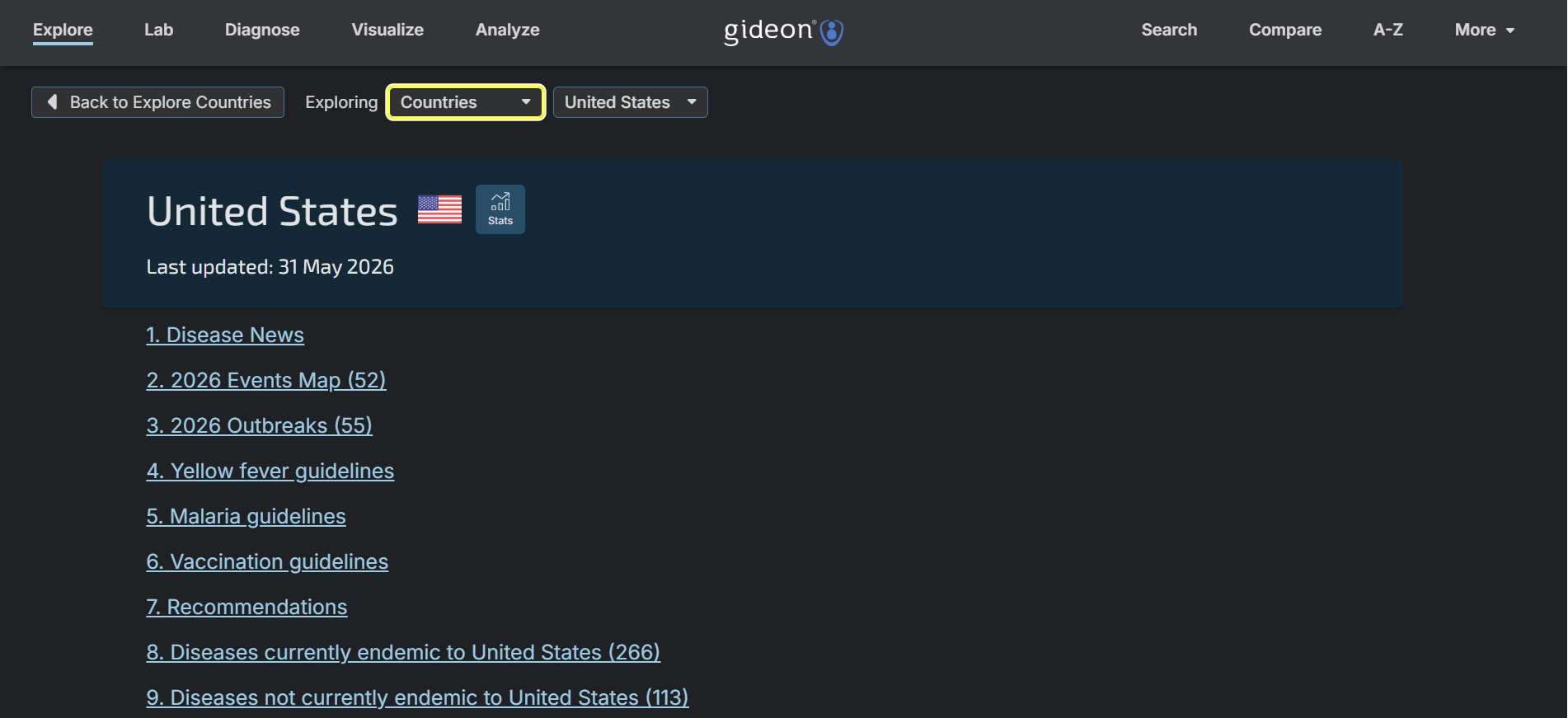
To ensure users never lose track of your location on the page, GIDEON utilizes a high-contrast focus indicator. As users TAB through the platform, the currently selected element will be clearly highlighted with a distinct outline, making keyboard navigation highly visible and intuitive.
The following screenshot was taken in dark mode on the United States country page.